
AI-powered movement screening
Onescrin
AI that watches an athlete move
and tells the coach what to fix.
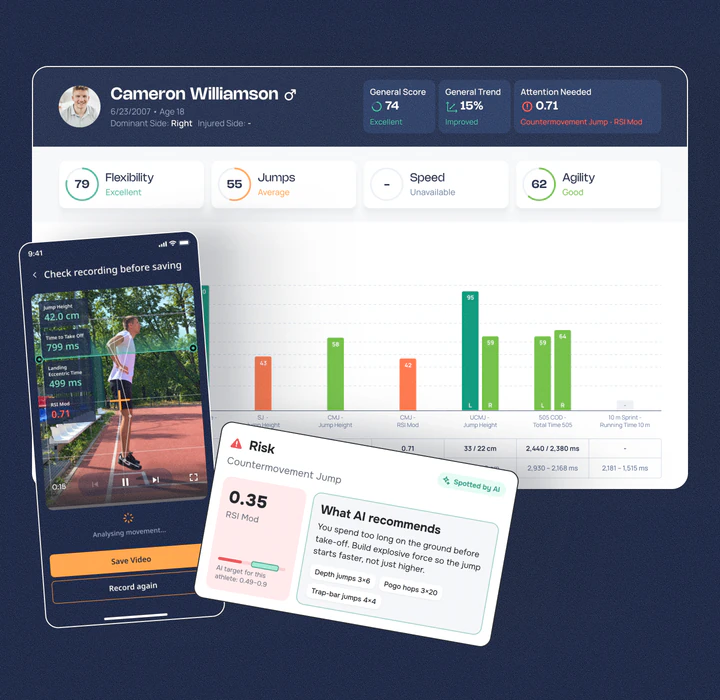
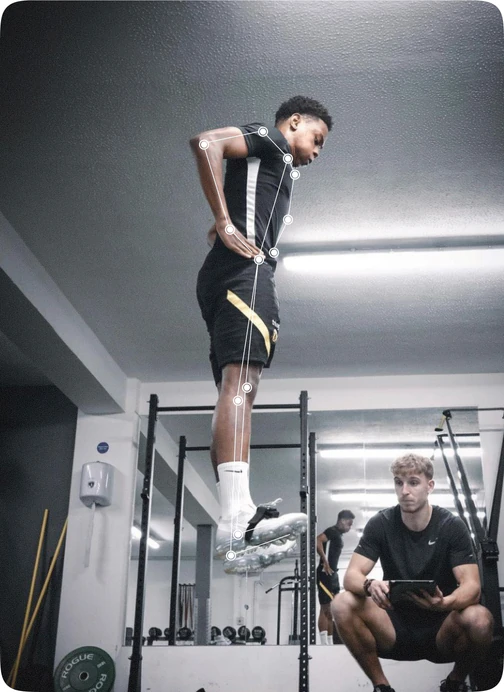
One phone video becomes a full screening report. Computer vision tracks every joint frame by frame, scores flexibility, jumps, speed and agility, and flags injury risk before it turns into an injury.
- 1
Record
Film a standard test on any phone.
- 2
Track
Maps the body in motion.
- 3
Score
Objective KPIs, not guesswork.
- 4
Advise
AI explains the risk and builds a plan.
- Project
- AI web platform
and mobile apps - Technologies
- Computer vision,
pose estimation, risk models
Who We Are
New Stream Ltd. develops comprehensive software for the biomechanical analysis of body motions. To create practical solutions, our company conducts cutting-edge research in sports, health, and rehabilitation. We are also revisiting existing physical fitness assessment methods to make athletic performance measurements more accurate and comprehensive.
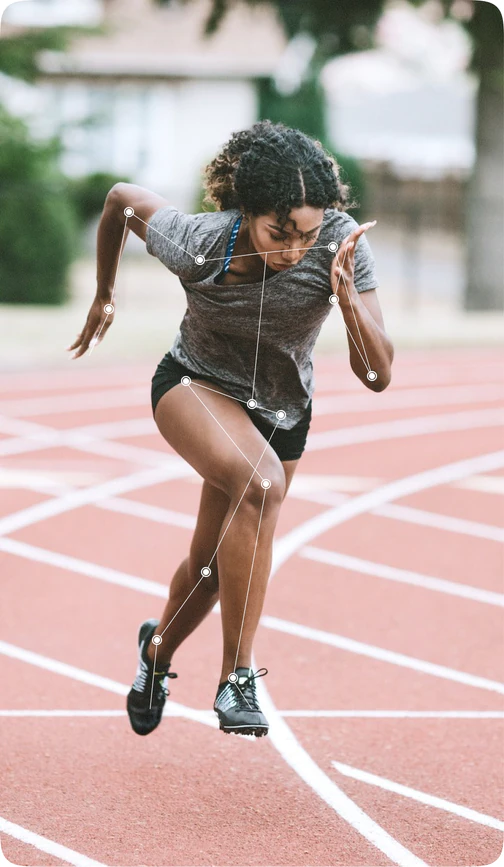
Our core is a video-based biomechanical analysis engine. A phone camera replaces lab equipment: our team researched and benchmarked several pose-estimation frameworks (MMPose, YOLOv8, Google MLKit) to find the combination accurate enough for sport-specific movement tests, then trained and tuned detection on athlete movement patterns — jumps, sprints, change-of-direction, mobility screens — so the same clip that a coach films on-field becomes lab-grade skeletal tracking.
- Industry:
- Healthcare
- Website:
- onescrin.com
- Location:
- Israel
Product ecosystem
One Tech Stack,
Three Connected Apps
What sits under the "Onescrin" name today is a small product family sharing one backend and one computer-vision core.
- Flagship
Onescrin
The main coach app plus its web back office — session planning, full test battery, AI reports and practice-plan generation.
- Live on stores
Jumpwise
A lightweight coach app with a focused test set — built for speed of adoption, currently in ongoing improvement cycles.
- In development
Movance
A companion app for the athlete side — personal progress, assigned practice plans and session history.
Tech stack
What Powers the Onescrin Platform
One stack across the coach app, Jumpwise and the athlete app — web, mobile, backend, and the computer-vision layer underneath.

Frontend
- React JS
- CSS Modules
- Webpack
- Vite

Mobile
- React Native
- Expo

Testing
- pytest
- flake8

Dev Tools / AI
- GitLab
- VS Code
- CVAT
- Claude Code
- Codex

Backend
- Python
- Django 3.2 + DRF
- PostgreSQL
- Redis + Celery / Celery Beat
- Gunicorn
- Docker

ML / Computer Vision
- Python
- FastAPI
- PostgreSQL
- OpenCV
- MLKit
- MMPose
- YOLOv8
- SEM
- FFmpeg
- Pandas
- NumPy
- OpenAI API

Cloud & Infrastructure
- AWS
- Terraform
- boto3
- django-storages
- video pipeline via S3
- CloudFront + Vimeo

Integrations & Services
- Vimeo
- SendGrid
- Brevo
- FCM
- Firebase
- PostHog
- Cardcom
- Google Cloud Translate
- Rollbar
- COMPUTER VISION
- CLOUD PROCESSING
- AI REPORTING
From Video to Biomechanical Report
Capture
Coach films the test on a smartphone; video is uploaded directly to secure cloud storage.
- AWS S3
- CloudFront
Pose detection
Frame-by-frame skeletal tracking extracts joint angles, timing and trajectory for each rep.
- OpenCV
- MMPose
- YOLOv8
- MLKit
- FFmpeg
Async processing
Video jobs are queued and processed off the main thread so the app stays responsive during heavy sessions.
- Celery
- Celery Beat
- Redis
Scoring & norms
Raw metrics are graded against age/sport-specific benchmarks and combined into a general score.
- Pandas
- NumPy
AI report generation
Findings are translated into a coach-readable summary with recommendations and suggested drills.
- OpenAI API
Project goals

Performance Analysis
Track athletic performance for continuous improvement.

Injury Prevention
Implement tools to reduce the risk of injuries during training.

Training Optimization
Customize workouts for maximum efficiency and results.

Report Tracking
Provide detailed progress reports for better goal management.


Application Description
The Athlete Assessment Tool (AAT) is an innovative mobile platform designed for quick and accurate performance assessments using only a smartphone. It replaces traditional lab-based evaluations with real-time data processing and actionable insights, making it accessible, efficient, and cost-effective. AAT leverages AI and machine learning to create personalized training plans, optimize performance, and reduce injury risks.

Stations overview
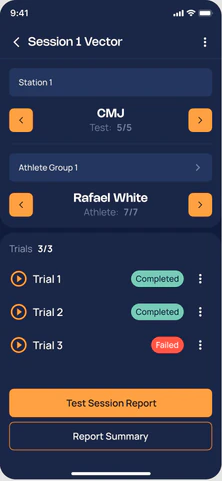
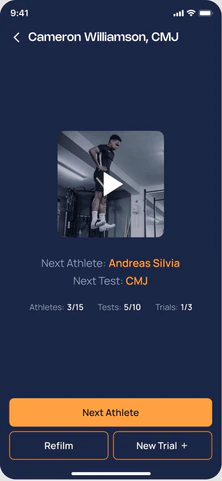
The Stations feature allows coaches to split a large team into multiple stations. Each station is responsible for a specific set of tests, helping organize the workflow and speed up data collection when working with groups of athletes.
Station workflow
Within a station, coaches or assistants work with an assigned group of athletes: running tests, recording results, and tracking progress. This approach simplifies team coordination and reduces the workload on a single specialist.
Application Screens Overview
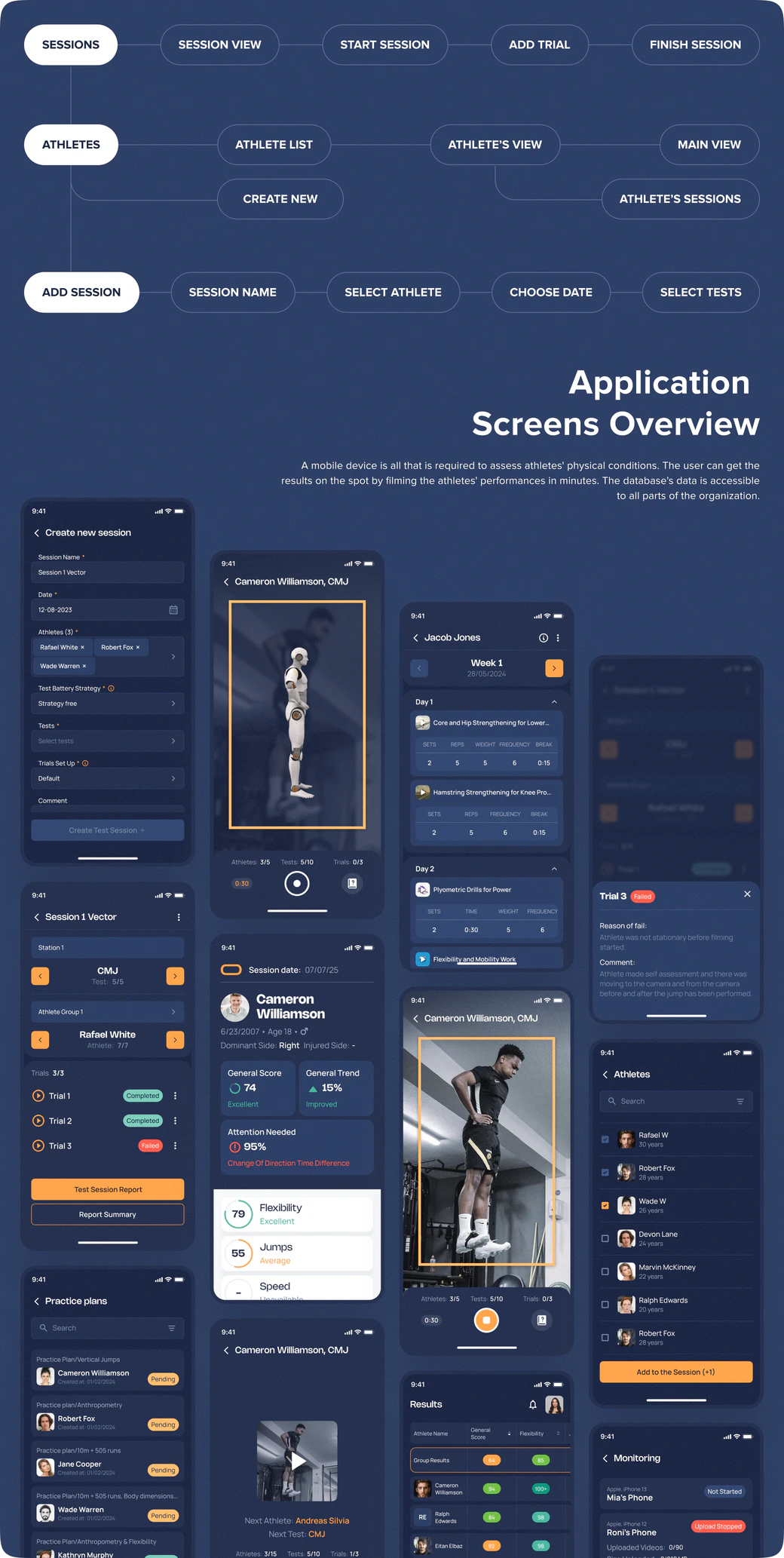
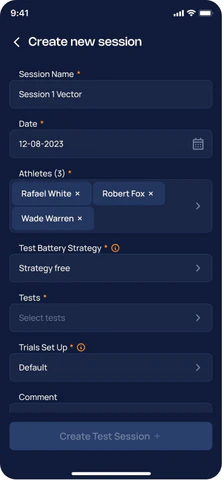
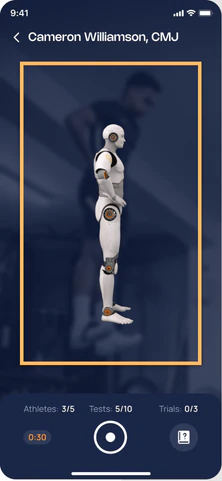
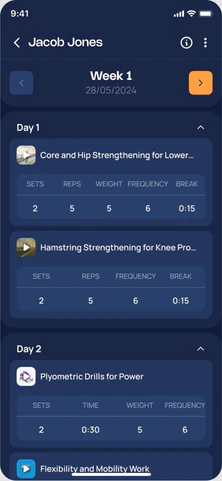
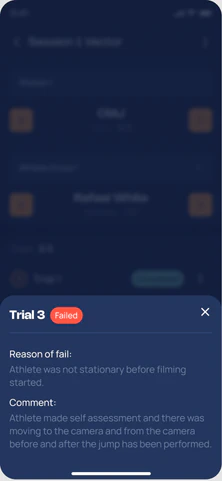
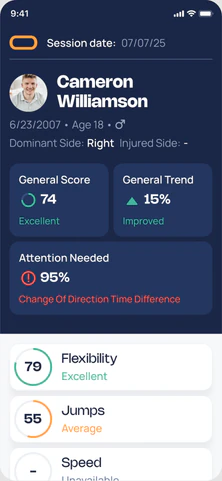
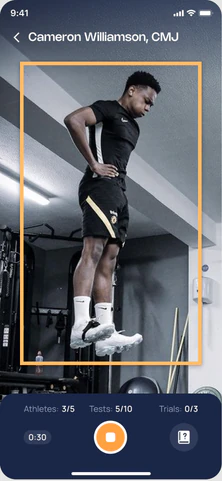
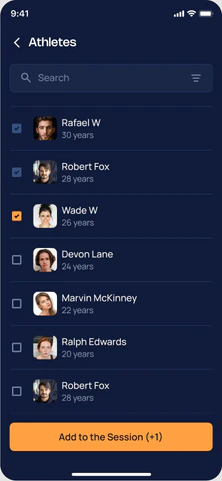
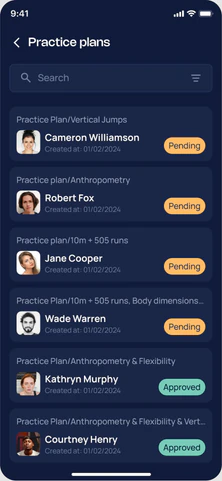
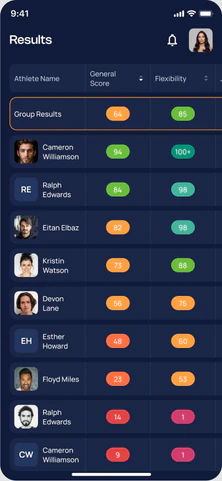
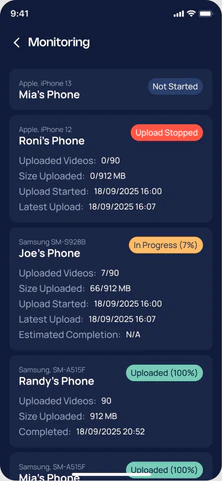
A mobile device is all that is required to assess athletes' physical conditions. The user can get the results on the spot by filming the athletes' performances in minutes. The database's data is accessible to all parts of the organization.
Steps of work
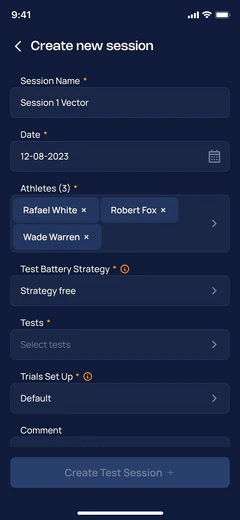
- 1
Select athletes, tests, create test session
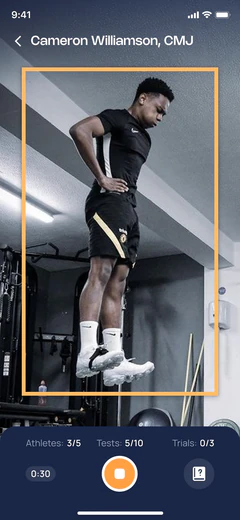
- 2
Film athlete using smartphone's camera
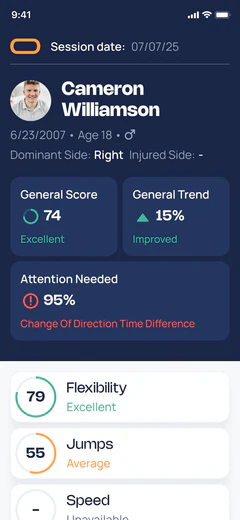
- 3
Receive a detailed performance report
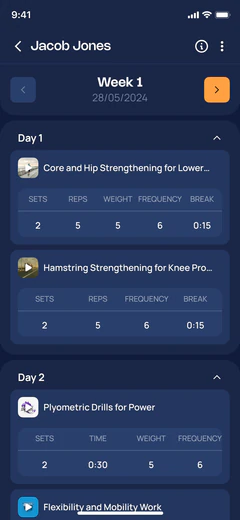
- 4
Get a personalized practice plan
Back Office
The back-office serves as the control center for the Athlete Assessment tool, where training programs are created, AI-driven workout allocations are managed, and coaches fine-tune plans. The web version is optimized for strategizing and refining performance plans, ensuring a comprehensive approach to athlete development.
Meanwhile, the mobile app functions as the field tool, enabling coaches to assess athletes, log sessions, track progress, and access reports. On-field data collection occurs through the app, while all strategic planning and performance optimizations are conducted via the back-office platform to maximize athlete potential.

Back office main functionality
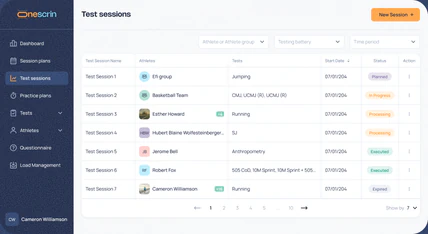
Test Sessions
Coaches can create and manage testing sessions from either the mobile or web app. This page provides a clear overview of all test sessions — planned, in progress, processing, executed, or expired — so coaches always know the current status and can quickly return to any session to review data or results.
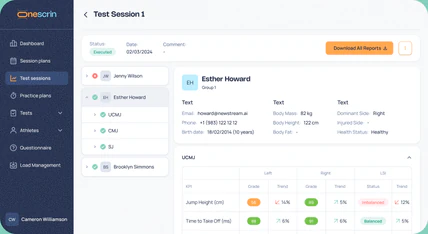
Test Session Results
It brings together athlete details, completed test types, and AI-generated performance metrics in one place. Coaches can quickly review key KPIs, compare left/right symmetry, track trends, and identify imbalances — then download reports or move seamlessly toward building a personalized practice plan based on the results.
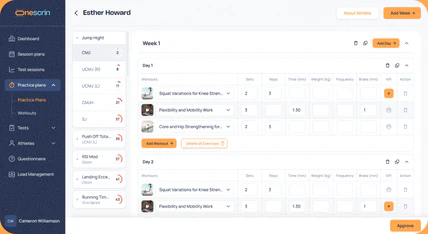
Practice Plan
Coaches can review the AI-generated structure, add or remove recommended workouts, and adjust weeks, days, sets, reps, load, frequency, and rest — all in one clear layout. KPIs from test results remain visible to guide decisions, enabling quick customization and approval of a plan tailored to the athlete's needs.
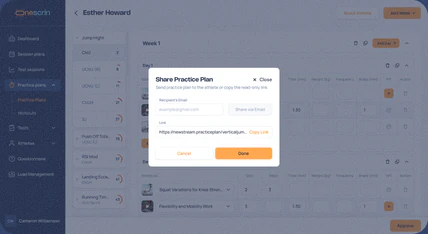
Share Your Practice Plan
This step makes it easy to deliver the final plan to the athlete. Coaches can send it by email or share a secure link, so athletes can quickly access their workouts, understand expectations, and start training without confusion or extra steps.
Practice plan

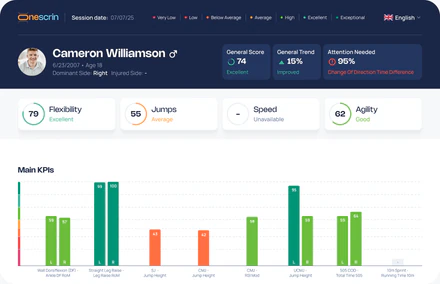
Short Report
The Short Report provides a quick, high-level overview of an athlete's performance across all completed tests. It is designed for fast on-field assessment, immediate feedback, and efficient progress tracking.
The report includes:
- General scores and performance trends
- Key KPIs with clear visual indicators
- AI-driven insights highlighting strengths, weaknesses, and risk areas
- SHORT REPORT
- KPIs
- SCORE
- RECOMMENDATIONS
- SUMMARY
- TRENDS
Key KPIs
Scores and Trends
AI-driven Insights
Short report main functionality
Executive Overview
A concise overview of the athlete's key scores, trends, and risk areas. It lets coaches quickly understand current performance at a glance without reviewing the full report.
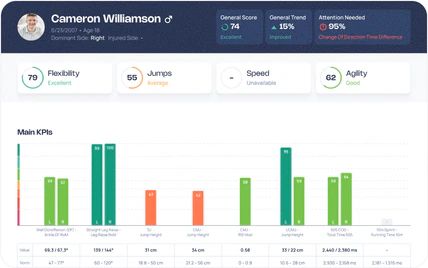
Summary & Recommendations
A clear explanation of key findings and AI-driven training advice. It highlights limitations, suggests focus areas with exercises, and provides context for how scores are calculated.
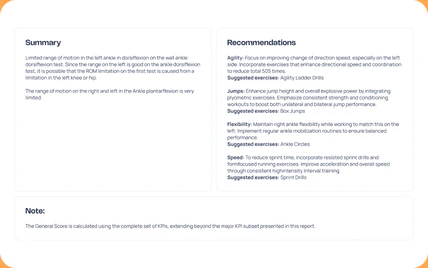
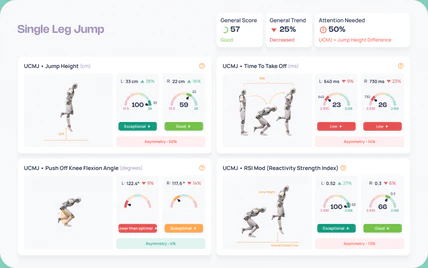
Movement Metrics Breakdown
An in-depth view of biomechanical metrics derived from AI video analysis. Each metric highlights performance level, asymmetry, and potential risk, enabling data-driven coaching decisions.
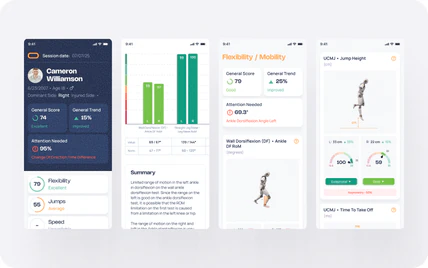
Mobile Report Access
The same performance insights, redesigned for mobile. Coaches can review results, track progress, and apply recommendations directly during training sessions.

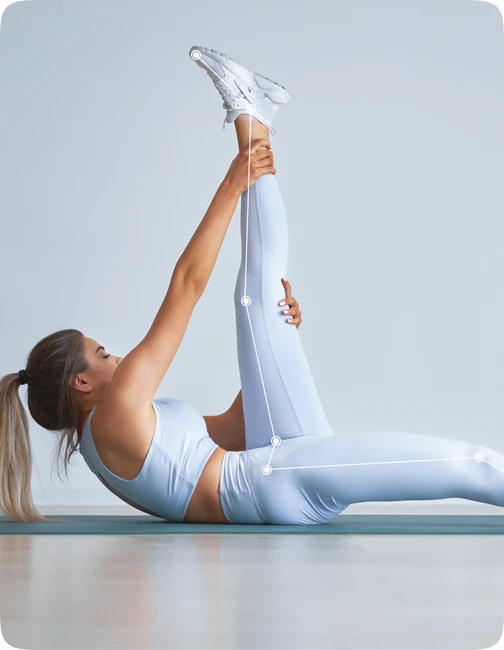
Extended Report
The Extended Report delivers an in-depth analysis of each individual test completed by the athlete. It is designed for advanced performance analysis, training optimization, and long-term athlete development.
The report includes:
- Detailed biomechanical and performance metrics
- Norm-based scoring and grading
- Technique efficiency indexes
- Historical trends
- Personalized AI-generated recommendations
- EXTENDED REPORT
- METRICS
- KPIs
- SCORE
- RECOMMENDATIONS
- SUMMARY
- TRENDS
Detailed Metrics
Scores and Grades
Historical Trends
Extended report main functionality
Test Execution Guidelines
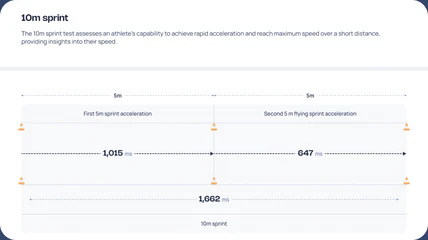
A clear breakdown of how the test is performed and measured. It shows key phases, distance segments, and timing captured from video, helping coaches quickly understand what's analyzed and how the final result is calculated.
Detailed Metric Breakdown
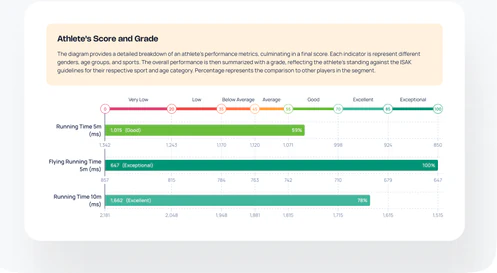
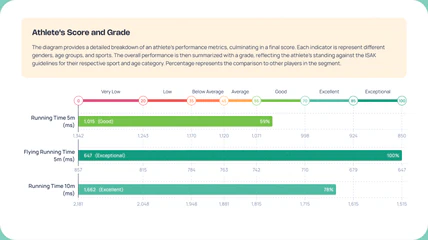
A detailed view of each measured metric, showing how the athlete ranks against standardized benchmarks. Clear scoring bars, percentile comparisons, and category labels help coaches quickly interpret strengths, gaps, and overall performance levels.
Historical Data
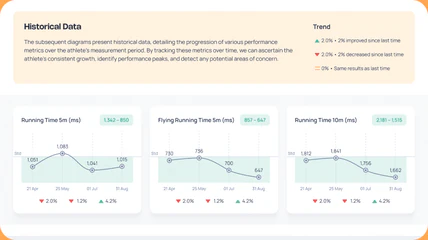
The following diagrams display the athlete's performance metrics progression. This tracking helps identify growth patterns, performance peaks, and potential areas for improvement.
Average Tests Score
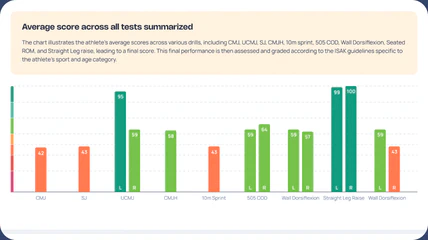
The chart illustrates the athlete's average scores across various drills, leading to a final score. This final performance is then assessed and graded according to the ISAK guidelines specific to the athlete's sport and age category.

Interested
in our services?
Fill out the form, or contact us at:
Let's work together